

Today, I feel proud and powerful to release the next version of my Form Maker. This one solves the most limiting shortcoming of the prior version I posted last week: Event planners no longer have to fill out the forms themselves.
In the next two sections, I will reveal why I feel both proud and powerful.
Hello! I am Nirav - a programmer for 20+ years. I solo-published several content-centric apps. When internet businesses were being born, I self-published a nonfiction book.
Brain Bound Learning is focused on linguistics and cognitive science - two branches that have grown in parallel since the invention of modern computers. Our future will increasingly depend on how our brains learn, and how we communicate with machines and each other. Brain Bound Learning started in 2023, and I believe it happened at the right time.
While I will try to simplify concepts of these two disciplines, it also means that every article in Brain Bound Learning will try to update a reader’s mental model - even when it is not about any of them. This is a step above declarative AI tutorials that teach you “How to do X by prompting Y”. The full range of ELI-5 to ELI-50 will be available.
AI and LLMs are a huge mental leap for mankind. Brain Bound Learning will try to bridge the skill gap that’s being widened by them every day.
As part of Brain Bound Learning, I also publish free tools for subscribers under the Single Page Sandbox series. I vibe code them to make creators’ lives easier. You are welcome to visit the Single Page Sandbox to access them all. They are:
Completely free
Sign-up free
Often, runnable offline
Downloadable from TipsNGuts.com
The Form Maker SaaS playground:
I feel proud, because this tool helps creators and coaches solve the most cumbersome data problem: Form fill-up. If you are a small creator and are paying the SaaS companies a monthly subscription for an easily automatable task, this tool is for you. No dirty “Give your data, have compute as long as you pay us” exchange.
There are no lock-ins and no log-ins, because one can run Form Maker Plus (just like every other Single Page Sandbox tool) on a local computer, without even connecting to the internet.
The only two things Form Maker Plus lacks (still!) are:
Ability to define conditional form logic (if answer to first dropdown is No, render Textbox 1, otherwise render Textbox 2). This is the “A-B-C” of the no-code platforms
Cloud backup of the forms by default
There’s no reason these shortcomings can’t be addressed using a single HTML form, but most creators/coaches who are starting aren’t looking for these features.
For them, Form Maker provides everything: no sign-ups, no contracts, no subscriptions, no remembering the monthly usage. Just make your form, distribute it, and collect the filled forms.
To get an idea of how much the world is spending after this simple function, see the table below. I haven’t included Google Forms because Google’s valuation isn’t reliant on form-filling.
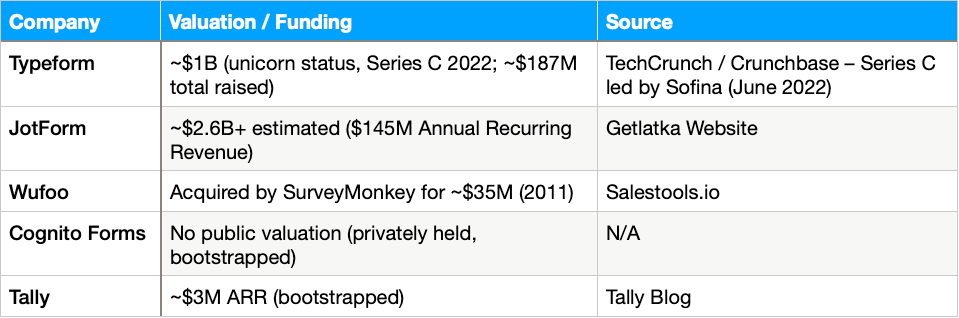
Going by the Pareto principle, a sizable chunk of their revenue must be coming from a few, big corporate players on a per-seat license basis, while a majority of their customers might be free-tier creators that are testing the waters. They only want a simple form creation, which is what the Form Maker and Form Maker Plus provide.
How does the Form Maker Plus Work:
I feel powerful because I built it using Claude Code in 24 hours. And I am going to reveal my process here.
But first, let’s go through what Form Maker Plus does:
Helps event organisers (coaches, speakers, workshop holders) create participation forms using 8 different controls
Helps them to share the blank forms with participants, and participants can upload them back to the Google Form that can be embedded within the forms by the organizers (this feature is what separates Form Maker Plus from Form Maker I made earlier, and I promised to upgrade it)
Helps them to fill out the forms on behalf of participants, in case participants aren’t digital-savvy. (This was already possible in the Form Maker)
Steps:
Download Form Maker Plus from TipsNGuts.com (detailed instructions at the end of the article)
As an event organiser, design the form with various data fields. Customize it with your brand logo and event name.
By default, “Send blank form to participants” is selected.
For this to work the most seamlessly, create a Google form that contains a file upload field that accepts PDF forms. Make it shareable. Paste the link to the “Google form” field. This link is now embedded into the participant’s form. They can click it and directly upload their filled PDF there.
Alternatively, you can also share your email, which will be embedded into the form participants fill out.
Participants will get the zipped, blank form. They can extract the HTML, fill it, export the PDF, and upload it / email it to you, depending on the option you chose in step 3.
If your participants aren’t digital-savvy, choose the “Fill the form yourself” option. Then you can enter their details on their behalf, and print the CSV / individual PDFs (up to 15 at a time). This is the most suitable choice when you don’t know who is going to attend your event.
A video is worth a thousand pictures:
My Claude Code Interactions to create Form Maker Plus:
This was the most interesting part.
My prompts weren’t outstanding. I just knew the pain points involved in the form-filling ordeal. I had some familiarity with Typeform and JotForm solutions. So I decided to make a compelling option.
- Build a drag-and-drop form maker using these custom controls.
- How do I share it so that participants can fill up their own data without
organizer having to fill it?
- How participants can upload it to a central location without seeing each other’s forms?
- Build this under the constraints: It should be a single HTML page without the
need to download any code from the internet. It should be secure to run in every browser.
My process was filled with a lot of zero-shot interactions to analyze the existing solutions’ strengths and how much I could address within the local-execution constraints.
Looking back, I wish I had a more structured approach to this. If that were the case, it could save me a lot of back-and-forth prompting, and the entire thing could be ready in 4-6 hours.
For example, I could solidify my complete intention using a comprehensive CLAUDE.MD that could act as a PRD (Product Requirements Document). Elena | AI Product Leader has come up with some extremely resourceful instructional material on how to move up the value chain: From low-level coding to high-level intent.

And yet, it wasn’t the HTML page building that took the most time, but the demo video. Earlier, I had used Claude Code’s playwright MCP, but the process wasn’t smooth. Also, I wanted a finer-grained control over it. Past demo-recording, I also spent a lot of time annotating various features. I used MacOS Final Cut Pro for that.
Apart from the HTML page creation, I also used Claude to perform the competitor analysis and how Form Maker stood out, and where it lagged.
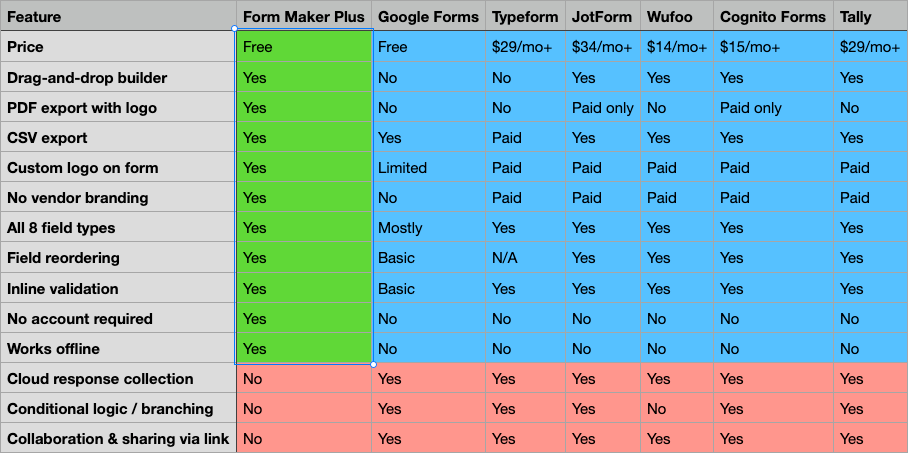
I already put my draft comparison in the Form Maker post, and I am putting the refined version here now. The green region is where Form Maker Plus beats everyone. The red region is where it lags (except for the collaborative aspect, which it tried to improve over Form Maker).
Download Form Maker Plus:
The Form Maker Plus is freely distributed as part of the Single Page Sandbox series for all subscribers of Brain Bound Learning.
Every Single Page Sandbox offering is downloadable from Tipsnguts.com.
Download Formula Worksheet Maker from this link. You will be added as a free subscriber to Brain Bound Learning. This will encourage me to dedicate my time to creating more free tools. This is a no-obligation subscription. You can always unsubscribe from your Substack console. Your Single Page Sandbox product is yours to keep.
Unzip and open index.html. Use it as you want.
As always, enjoy Form Maker Plus. If you run into any issues, I am always a DM away!
This is a great guide, Nirav! Thanks much for the mention. :)